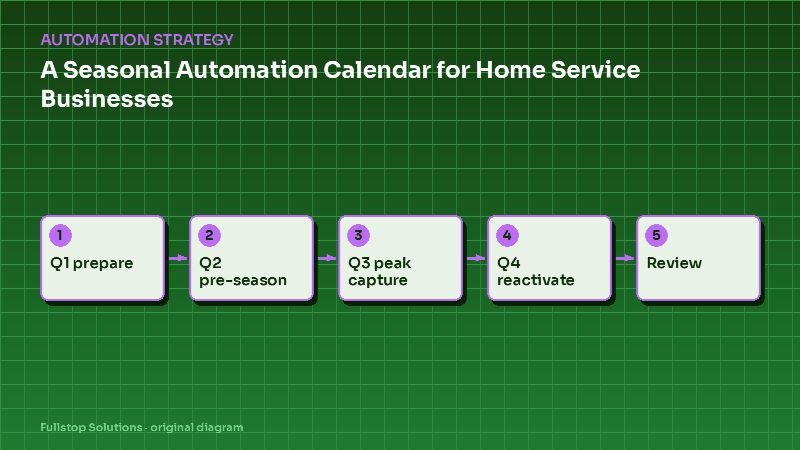
Short answer: plan home service automation around the weather. Use slow months to build and clean up, run pre-season tune-up and maintenance campaigns before demand rises, switch to maximum call capture and fast dispatch at peak, and reactivate past customers and old quotes when things slow down. Review results at the end of each season and adjust.
Why a calendar helps
Home service businesses live with demand that swings with the weather, but most automation gets built reactively, in the middle of a crisis. A calendar flips that: you prepare in quiet periods, so the systems are ready when the phones light up. The quarters below assume a typical US pattern; adjust them to your region and your own call history.
A note on regions
A cooling season in Arizona starts earlier and runs longer than in Minnesota; storm and hurricane seasons vary along the coasts; snow and freeze risks matter in the north. Pull 12 months of call volume from your phone system to see your own peaks before using this calendar.
Q1 (January to March): build and prepare
- Audit last year: where did calls go unanswered, which quotes went stale, which customers did not return? See the automation audit guide.
- Clean the CRM: deduplicate, fix phone numbers, update consent. See CRM setup for automation.
- Build or tune call capture: missed-call text-back and AI receptionist overflow, so they are ready before demand rises.
- Heating trades: no-heat priority routing during cold snaps.
- Tax-time and planning messages: for replacement projects, homeowners often plan early in the year.
Q2 (April to June): pre-season
- Cooling tune-ups: HVAC maintenance agreement scheduling in batches by area. See best automations for HVAC companies.
- Landscaping and irrigation: spring start-up booking, irrigation checks and recurring service sign-ups. See landscaping automation.
- Pest control: seasonal service plan renewals and pre-season treatments. See pest control recurring service automation.
- Roofing: pre-storm inspection offers where storm season is approaching.
- Review requests: from winter jobs, if not already sent.
Q3 (July to September): peak capture
- Maximum call capture: every missed call gets a text within a minute; overflow goes to the AI receptionist.
- Priority rules: for no-cool calls with vulnerable occupants, active leaks, or storm damage. The National Weather Service's heat safety page explains why extreme heat is dangerous; your messages can link to official safety guidance rather than giving advice.
- Dispatch and on-the-way texts: to reduce "where is my tech?" calls. See field service dispatch automation.
- Storm response: for roofing and restoration, structured intake for storm damage and fast inspection scheduling. See storm damage roofing and roofing speed to lead.
- Pause non-urgent marketing: you will not have capacity for it.
Q4 (October to December): reactivate and renew
- Heating tune-ups and furnace checks for HVAC.
- Winterization: irrigation blowouts, pipe freeze prevention messages for plumbing, with links to official guidance such as the NWS weather safety pages.
- Quote reactivation: follow up on summer quotes that never closed.
- Past-customer reactivation: customers who have not booked in over a year, where consent allows.
- Maintenance plan renewals before year-end.
- Review requests from peak-season jobs, and a referral ask.
End-of-season review
After each peak, review: unanswered call rate, booking rate, average time to dispatch, quotes won, agreements sold and reviews collected. Compare with the previous year. Adjust the calendar and the automations for next season.
Trade-specific timing
| Trade | Typical peak | Off-season focus |
|---|---|---|
| HVAC | Summer and winter extremes | Tune-ups, replacements, agreements |
| Plumbing | Freezes, holidays | Water heater replacement, drain maintenance |
| Roofing | Storm season | Inspections, replacement planning |
| Landscaping | Spring and summer | Contracts and renewals |
| Pest control | Warm months | Annual plans, prevention |
| Electrical | Varies | Panel upgrades, EV chargers, generators |
These are general patterns; your own data decides.
Mistakes to avoid
Building during peak. Use the slow season.
Marketing when you have no capacity. Pause campaigns during peaks.
Forgetting the off-season. It is when reactivation and renewals pay off.
Ignoring your region. Use your own call history.
Questions to settle before you plan
When are your three busiest and three slowest months, according to your phone data? Which services fill slow periods best? What counts as an emergency for priority routing? Who reviews results each season? These answers make the calendar yours.
Turning the calendar into tasks
A calendar only works if someone acts on it. Convert each quarter into dated tasks in your project tool or CRM:
- Six weeks before your first peak month: test missed-call text-back and overflow answering with live test calls from a personal phone.
- Four weeks before: load maintenance customers due for tune-ups and schedule them by area.
- Two weeks before: confirm priority routing rules with dispatch and check after-hours coverage.
- First week of peak: review unanswered calls daily and adjust staffing or overflow rules.
- Two weeks after peak: send review requests for completed jobs and start quote reactivation.
- End of the quarter: run the season review and record what to change.
Assign each task an owner. Seasonal work slips most often because it belongs to everyone.
Using weather data responsibly
Some businesses connect forecast alerts to internal notifications, so dispatch knows a heat wave or freeze is coming and can prepare. That is useful. Be more careful with customer-facing messages during dangerous weather: point people to official safety guidance from the National Weather Service, avoid alarmist wording, and never imply you can respond faster than you can.
Worked example with your own call data
Take your monthly call counts from last year. Mark the three highest months as peak and the three lowest as off-season. For each peak month, divide unanswered calls by total calls to get your miss rate. If it climbs well above your normal months, call capture is the first project. If off-season revenue is the bigger worry, start with reactivation.
Where to start
Pull last year's call volume by month and mark your peaks. Then pick one preparation task for the coming quiet period. Our home services automation page and lead intake and follow-up service can help.